


How to enable Object and Session level Auditing in PostgreSQL


Certifications:

- How to enable Object and Session level Auditing in PostgreSQL - 28 September 2026
- How to upgrade PostgreSQL to a newer version - 23 September 2026
- How to maintain Indexes and Statistics in a PostgreSQL database - 18 September 2026
When you manage production databases, sooner or later the time comes when security and compliance requirements will knock on your door. The question is not whether you will need to record who did what, but how to do it without bringing the Server to its knees, e.g. excluding the application server user. In this article we will see how to properly set up the pgAudit.
The installation
We must first download and install the corresponding pgAudit version for the operating system and PostgreSQL version we have, e.g. for RedHat Linux and PostgreSQL 11:
sudo yum install pgaudit11
Then we go to the file postgresql.conf and add its library:
su postgres
vi $PGDATA/postgresql.conf
shared_preload_libraries = 'pgaudit'
pgaudit.log_catalog = off
log_line_prefix = '%m [%p] %q%u@%d '
Then it wants to restart:
sudo systemctl restart postgresql-11
Once uploaded, the extension needs to be activated from SQL window:
CREATE EXTENSION pgaudit;
Session level auditing
With session level auditing we can monitor any user we want for any action we want (read,write,ddl,misc,all,none) universally.
If we want to monitor write and ddl for a user we run:
ALTER ROLE stratos SET pgaudit.log = 'write, ddl';
If we want to monitor all users but to exclude the application server user so as not to be filled with useless information:
ALTER SYSTEM SET pgaudit.log = 'write, ddl';
SELECT pg_reload_conf();

ALTER ROLE app_user SET pgaudit.log = 'none';
Alternatively we can add it to postgresql.conf(wants to reload):
pgaudit.log = 'write, ddl'Object level auditing
In this case, we have the ability to perform separate auditing per user and per table by creating roles.
We can create the role we want, e.g. select_auditor, give it the right to audit what we want and finally give this role to the users we want:
CREATE ROLE select_auditor;

GRANT SELECT ON public.customers TO select_auditor;

ALTER ROLE stratos SET pgaudit.role = 'select_auditor';
Because we can only give one role as pgaudit.role If we want to give a user two different auditing policies, we associate a master role with the others:
CREATE ROLE pgaudit_master;
CREATE ROLE my_select_auditor;
CREATE ROLE my_update_auditor;

GRANT my_select_auditor TO pgaudit_master;
GRANT my_update_auditor TO pgaudit_master;

GRANT SELECT ON public.orders TO my_select_auditor;
GRANT UPDATE, INSERT ON public.orders TO my_update_auditor;

ALTER ROLE stratos SET pgaudit.role = 'pgaudit_master';
Similarly, if we want to do some object level auditing again excluding the application server user:
ALTER SYSTEM SET pgaudit.role = 'pgaudit_role';

SELECT pg_reload_conf();
Alternatively we can add it to postgresql.conf(wants to reload):
pgaudit.role = 'pgaudit_role'And after granting the rights we want to request to the role, we exclude the user from the role:
CREATE ROLE pgaudit_role NOLOGIN;

GRANT UPDATE, DELETE ON public.order_items TO pgaudit_role;

ALTER ROLE app_user SET pgaudit.role = '';
How to read auditing logs
With the following query we can see what has been run, when, by which user, in which table:
WITH today_log AS (
    SELECT 'log/postgresql-' || to_char(now(), 'Dy') || '.log' AS log_file
),
raw_lines AS (
    SELECT
        line_number,
        log_line,
        COUNT(CASE WHEN log_line ~ '^\d{4}-\d{2}-\d{2}' THEN 1 END) OVER (ORDER BY line_number) AS event_id
    FROM (
        SELECT line_number, log_line
        FROM unnest(string_to_array(pg_read_file((SELECT log_file FROM today_log)), e'\n')) WITH ORDINALITY AS t(log_line, line_number)
    ) s
),
grouped_events AS (
    SELECT
        event_id,
        MIN(log_line) AS header_line,
        string_agg(log_line, e'\n' ORDER BY line_number) AS full_multiline_block
    FROM raw_lines
    WHERE event_id > 0
    GROUP BY event_id
),
parsed_events AS (
    SELECT
        event_id,
        header_line,
        full_multiline_block,
        ac[1] AS audit_class_val,
        ct[1] AS command_type_val,
        COALESCE(
            NULLIF(split_part(substring(header_line from 'AUDIT:.*'), ',', 7), ''),
            to_obj[1],
            'N/A'
        ) AS target_obj
    FROM grouped_events
    LEFT JOIN LATERAL (
        SELECT regexp_matches(header_line, 'AUDIT:\s*([A-Z]+),')
    ) AS a(ac) ON true
    LEFT JOIN LATERAL (
        SELECT regexp_matches(header_line, 'AUDIT:\s*[^,]+,\d+,\d+,[^,]+,([^,]+)')
    ) AS c(ct) ON true
    LEFT JOIN LATERAL (
        SELECT regexp_matches(full_multiline_block, '(?:FROM|INTO|UPDATE|DELETE\s+FROM)\s+([a-zA-Z0-9_\.]+)', 'i')
    ) AS t(to_obj) ON true
)
SELECT
    substring(header_line from '^([0-9]{4}-[0-9]{2}-[0-9]{2} [0-9]{2}:[0-9]{2}:[0-9]{2})') AS log_time,
    substring(header_line from '\] ([^@]+)@') AS user_name,
    substring(header_line from '@([^ ]+)') AS database_name,
    audit_class_val AS audit_class,
    command_type_val AS command_type,
    target_obj AS target_object,

    -- ΕΔΩ Η ΔΙΟΡΘΩΣΗ: Πιάνει το query είτε γράφτηκε με εισαγωγικά είτε χωρίς!
    rtrim(
        COALESCE(
            substring(full_multiline_block from ',\s*"([^"]+)",\s*<not logged>'), -- 1. Ψάχνει αν έχει εισαγωγικά (multiline / με κόμματα)
            substring(full_multiline_block from ',\s*([^",]+),\s*<not logged>'),  -- 2. Ψάχνει αν δεν έχει εισαγωγικά (single line)
            substring(full_multiline_block from 'QUERY:\s*(.*)$'),                 -- 3. Ψάχνει για Object Audit form
            header_line                                                            -- 4. Fallback αν αποτύχουν όλα τα παραπάνω
        ),
        '"'
    ) AS executed_query,

    full_multiline_block AS full_log_line

FROM parsed_events
WHERE header_line LIKE '%LOG:  AUDIT:%'
  AND header_line NOT LIKE '%WITH today_log%'
  AND header_line NOT LIKE '%pg_read_file%'
ORDER BY log_time DESC;
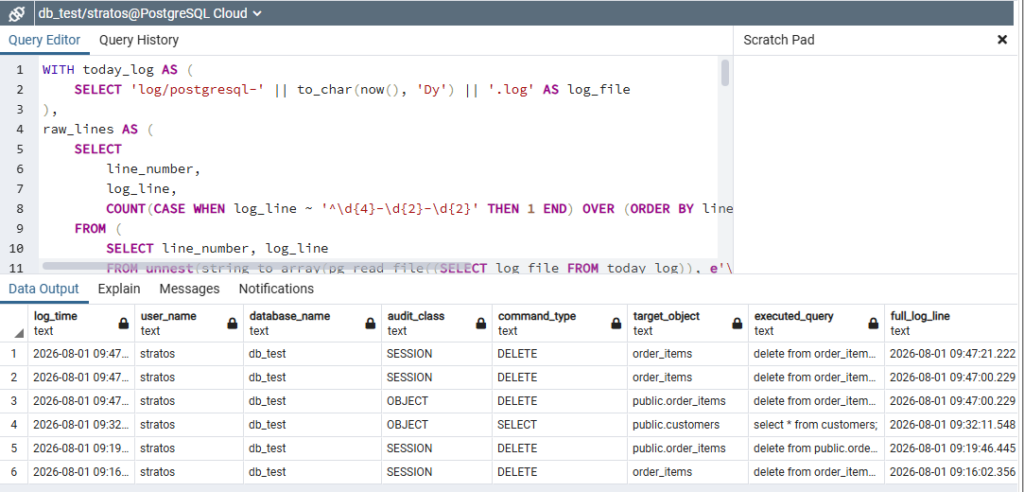
Maintenance of logs
If the parameter is enabled log_truncate_on_rotation it essentially makes us rollover the days we have set in the parameter log_rotation_age, if we don't want this and want to keep the information for more days, we will have to create some mechanism to delete old files.