

How to enable Data Masking in PostgreSQL


Certifications:

- How do we use pgvector in PostgreSQL for AI and Vector Search? - 26 October 2026
- How to enable Native Steaming Replication in PostgreSQL - 19 October 2026
- How to Partition an Existing Table in PostgreSQL and How to Maintain It - 12 October 2026
In this article we will see how we can implement data anonymization and masking in a PostgreSQL 14 database using the extension PostgreSQL AnonymizerWe will cover the installation process, setting up masking rules, as well as the specifics we encounter in this version regarding Transparent Dynamic Masking and the use of Views.
The installation
To install the extension on RHEL Unix, run the following:
sudo yum install -y postgresql_anonymizer_14
In order for PostgreSQL to load the extension into its core, we need to declare it in the shared_preload_libraries in the postgresql.conf:
su postgres
vi $PGDATA/postgresql.conf
Add or modify the line:
shared_preload_libraries = 'anon'Then, we restart the PostgreSQL service for the changes to take effect:
sudo systemctl restart postgresql-14
Now we connect to our database and activate the extension:
CREATE EXTENSION anon CASCADE;
(Optionally, if the architecture and version allow it, we enable transparent masking at the base level):
ALTER DATABASE db_test SET anon.transparent_dynamic_masking TO true;
(Note: After this command you may need to re-enter sudo systemctl restart postgresql-14).
To check that it is activated, run the following:
SELECT name, setting
FROM pg_settings
WHERE name = 'anon.transparent_dynamic_masking';
How do we define Masking rules?
We can define masking at the column level using SECURITY LABELFor example, in the table customers We apply masking to emails, countries and partial hiding to surnames:
SECURITY LABEL FOR anon ON COLUMN public.customers.email
IS 'MASKED WITH FUNCTION anon.fake_email()';

SECURITY LABEL FOR anon ON COLUMN public.customers.country
IS 'MASKED WITH FUNCTION anon.fake_country()';

SECURITY LABEL FOR anon ON COLUMN public.customers.last_name
IS 'MASKED WITH FUNCTION anon.partial(last_name, 1, $$***$$, 1)';
The function partial() is extremely useful as it allows us to keep a certain number of characters visible at the beginning and end, filling the spaces in between with a symbol (such as ***).
Its syntax is:
- prefix: Number of characters that remain visible at the beginning.
- padding: The symbol with which the intermediate characters will be covered (e.g.
***). - suffix: Number of characters that remain visible at the end.
Roles and Rights Management
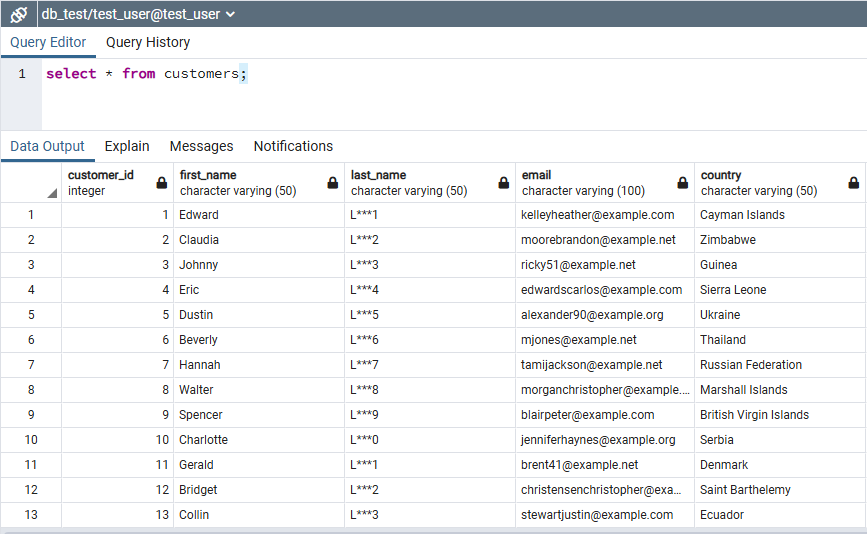
To define which users are affected by masking, we use security labels on roles. Defining a user as Masked means that the data will be seen masked as long as the mechanism is active:
SECURITY LABEL FOR anon ON ROLE test_user IS 'MASKED';
Important Note about Dynamic Masking: The rules of hiding it
pg_anonare only successfully applied when the array is called by its simple name (e.g.SELECT * FROM customers). If the query contains a name with the schema (e.g.SELECT * FROM public.customers), the mechanism may be bypassed and the user may gain access to the normal, raw data.
Defining a user as Admin means that it always sees the real data:
SECURITY LABEL FOR anon ON ROLE test_user IS 'ADMIN';
If we want to remove the masking rules, we run:
SECURITY LABEL FOR anon ON COLUMN public.customers.email IS NULL;
SECURITY LABEL FOR anon ON TABLE public.customers IS NULL;
Data Masking via View
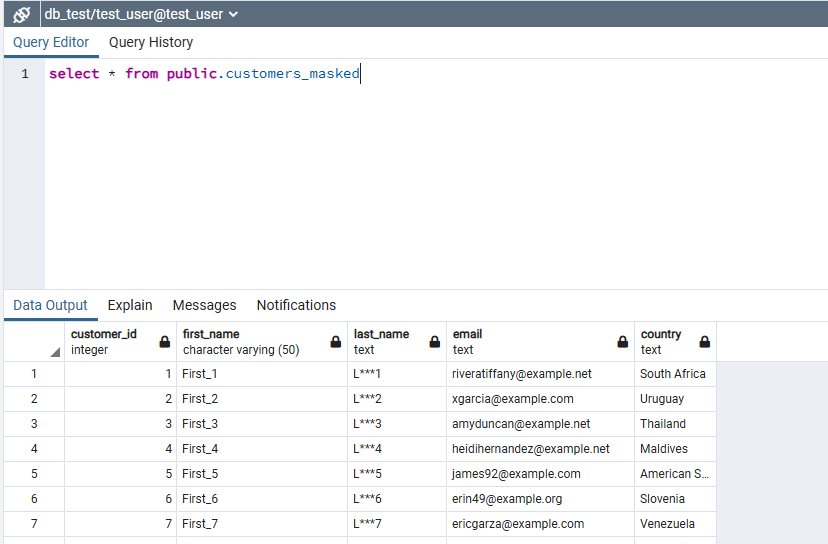
The most stable and secure way to offer masked data to ordinary users (such as test_user) is the creation of a Masked View:
CREATE OR REPLACE VIEW public.customers_masked AS
SELECT
    customer_id,
    first_name,
    anon.partial(last_name, 1, '***', 1) AS last_name,
    anon.fake_email() AS email,
    anon.fake_country() AS country
FROM public.customers;

REVOKE SELECT ON public.customers FROM test_user;
GRANT SELECT ON public.customers_masked TO test_user;
In this way, when the test_user executes its query on the view:
SELECT * FROM public.customers_masked;
Checking and Troubleshooting
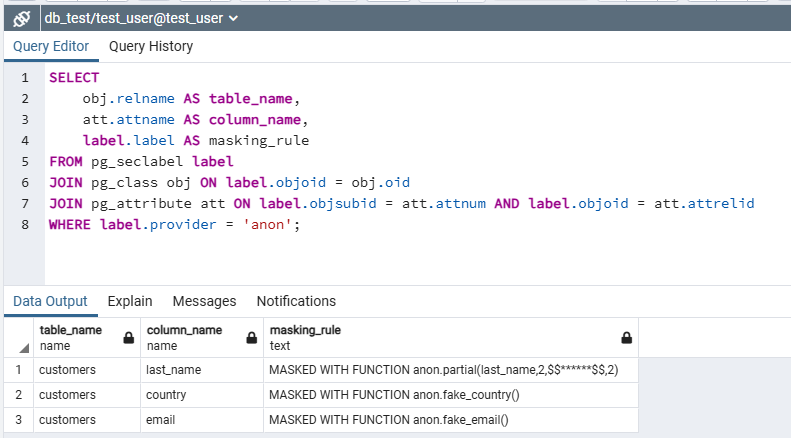
If we want to see which masking rules are active at any time, we run the following query:
SELECT
    obj.relname AS table_name,
    att.attname AS column_name,
    label.label AS masking_rule
FROM pg_seclabel label
JOIN pg_class obj ON label.objoid = obj.oid
JOIN pg_attribute att ON label.objsubid = att.attnum AND label.objoid = att.attrelid
WHERE label.provider = 'anon';