


How to create a Logon Trigger to control which users are allowed to connect to an Oracle Database


The journey began in 2008 where I officially started working in the field of IT (IT). Starting the first semester of school I realized a special attraction towards databases and automation. I have been involved with databases such as Microsoft SQL Server / Oracle Database, data analysis and automations using the command line (CLI), Visual Basic for Applications and Python. Through years of experience I have developed these capabilities so that I can make my life easier. For me, the purpose of every IT guy and every office worker is to have the knowledge so that through tools he can work a little but produce a lot. Through this his website DataPlatform.gr I try to offer knowledge and propose solutions to everyday problems.
Certifications:

Certifications:
Latest posts by Stratos Matzouranis (see all)
- How memory works in PostgreSQL and what parameters do we configure? - 11 August 2026
- What are WALs in PostgreSQL and how do we configure them? - 6 August 2026
- What is MVCC and Vacuum in PostgreSQL database and how do we avoid Bloat? - 29 July 2026
Many times, for security reasons, we may want specific users to connect only from specific machines - servers, and in the event that a connection comes from a different machine, not allow access but display a rejection message.
We can do this very easily in an Oracle database by creating a Logon Trigger by running the following code. The only thing that needs to be changed is the username and the hosts we want to allow to connect:
CREATE OR REPLACE TRIGGER logon_trigger
AFTER LOGON ON DATABASE
BEGIN
  IF USER = 'STRATOS' AND SYS_CONTEXT('USERENV', 'HOST') not in ('oracledev1','oracledev2') THEN
    RAISE_APPLICATION_ERROR(-20001, 'You are not allowed to login from this host.');
  END IF;
END;
/
When someone tries to connect from a host other than the two we excluded, they will see the following message:
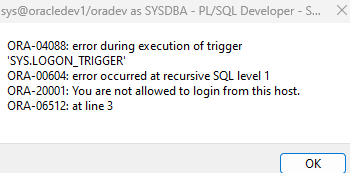
To disable it, run the following:
alter trigger logon_trigger disable;