


What are WALs in PostgreSQL and how do we configure them?


Certifications:

In this article we will look at the mechanism that connects memory to disk and ensures that we will not lose data if the database goes down (e.g. due to a power outage): the Write-Ahead Logs (WAL) and Checkpoints.
When we perform a INSERT, UPDATE ή DELETE, the change is initially made in memory (shared_buffer) and immediately afterwards recorded in the WAL file to disk, to confirm that the transaction was completed. If the server crashes, PostgreSQL reads the WAL files on restart and rerolls any changes that were not permanently written to the tables.
For those coming from Oracle, WAL files are the equivalent of Redo Logs, while in SQL Server it is Transaction LogIn PostgreSQL they are located in the /etc/postgresql/src pg_wal as 16MB files.
What is Checkpoint?
We can't keep the changes only in memory, because if the power went out, restarting would take hours reading days' worth of WAL files. The Checkpoint is the process by which PostgreSQL takes all changes from memory and physically writes them to the tables on disk. Once it is finished, old WAL files that are no longer needed are deleted.
If the checkpoint writes a large amount of data suddenly, the disk reaches 100% and the database crashes. That's why proper tuning is needed.
How do we configure them in the PostgreSQL service?
The default settings of PostgreSQL are very low, in production databases we adjust the basic parameters to postgresql.conf, which are dynamic, the service does not need to be down, just reload via SQL (SELECT pg_reload_conf();):
max_wal_size
Defines how much WAL is allowed to accumulate before the database is forced to checkpoint. 1GB (default) is too small and forces the database to constantly checkpoint. On production systems, we increase it to 16GB which is the standard, in large databases with thousands of records we may need to go to 32GB or even 64GB.
checkpoint_timeout
Sets the maximum time between two checkpoints. 5 minutes (default) is a very common interval, so we increase it to 15m to thin out the recordings on the disk.
checkpoint_completion_target
Defines how much of the time checkpoint_timeout the data recording must be spread out. With a value of 0.9 and checkpoint_timeout 15, PostgreSQL writes data incrementally over 13.5 minutes. This spreads out the write and eliminates deadlocks. In new versions it is already 0.9 and we leave it there.
Example:
vi $PGDATA/postgresql.conf
checkpoint_timeout = 15m
max_wal_size = 16GB
min_wal_size = 2GB
checkpoint_completion_target = 0.9
How do we see if tuning is needed?
To see if the checkpoints are done on time or if they are forced because the system is full. max_wal_size, we run the following query:
SELECT
    checkpoints_timed,
    checkpoints_req,
    checkpoint_write_time,
    checkpoint_sync_time,
    ROUND(100.0 * checkpoints_req / NULLIF(checkpoints_timed + checkpoints_req, 0), 2) AS forced_checkpoint_pct
FROM pg_stat_bgwriter;
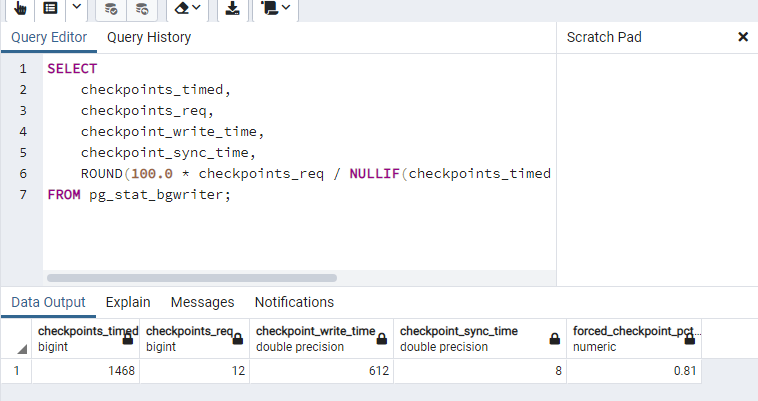
In the results, the checkpoints_timed shows the checkpoints that were made normally based on time, while the checkpoints_req shows the necessary ones because we filled the max_wal_size.
Our goal is the percentage forced_checkpoint_pct be below 10%If you see a higher percentage, it means the database is generating WAL too quickly and you need to increase the max_wal_size.
Sources: