


What is MVCC and Vacuum in PostgreSQL database and how do we avoid Bloat?


Certifications:

In this article we will see how the PostgreSQL manages concurrent access through the MVCC, what is the Bloat, what is the Data Churn, what is the Vacuum and how do we set it up correctly with Autovacuum.
What is MVCC (Multi-Version Concurrency Control)?
The MVCC is the mechanism that allows a database to serve multiple users simultaneously without blocking reads (SELECT) from writes (INSERT/UPDATE/DELETE) and vice versa.
When a UPDATE ή DELETE In PostgreSQL, the old record is not immediately deleted or rewritten to memory or disk. Instead, it is marked as dead tuple (old version) and at the same time a new version of the record is created for the current state of the database.
What is Data Churn and How Does Table Bloat Occur?
When we talk about Data Churn, we refer to the frequency with which they are performed UPDATE and DELETE in a table. Tables that are constantly changing have high churn. Because PostgreSQL, due to MVCC, does not overwrite data but creates new versions, high churn produces dead tuples incessantly.
The Table / Index Bloat is the direct result of this phenomenon. It occurs when the physical space occupied by a table or index on disk is much larger than the space occupied by the actual, active data. If the Autovacuum does not have time to clean up these dead tuples, the database fills up with empty space, forcing queries to read many more data pages and delay unnecessarily.
MVCC Comparison: PostgreSQL vs Oracle vs SQL Server
Although all three databases achieve isolated reads without locks, their internal implementation differs significantly:
- Oracle (UNDO Tablespace): Old versions of the data are written to the Undo Segment. The table always contains only the current version of the data.
- SQL Server (Snapshot Isolation): It uses Row Versioning, where old versions of rows are kept in the
tempdb(Version Store). - PostgreSQL (In-Place Versioning): It does not have a separate UNDO tablespace. All old versions of the rows (dead tuples) are stored within the table data files themselves. This creates table & index bloat, making the Vacuum process absolutely mandatory.
How do we find the boards that need cleaning?
To identify which tables we need to clean up, we use the view pg_stat_user_tables.
The following query returns the percentage of dead tuples and automatically generates a ready-made query for it. VACUUM ANALYSIS for immediate execution:
SELECT
    schemaname,
    relname AS table_name,
    n_live_tup AS live_tuples,
    n_dead_tup AS dead_tuples,
    -- Calculate dead tuples percentage over total rows
    CASE
        WHEN (n_live_tup + n_dead_tup) > 0
        THEN ROUND(100.0 * n_dead_tup / (n_live_tup + n_dead_tup), 2)
        ELSE 0
    END AS dead_tuple_percent,
    last_vacuum,
    last_autovacuum,

    -- Ready-to-use Vacuum Analyze command for immediate execution
    format('VACUUM ANALYZE %I.%I;', schemaname, relname) AS vacuum_cmd

FROM pg_stat_user_tables
WHERE n_dead_tup >= 0 -- Filter tables with dead tuples (change to > 1000 for stricter check)
ORDER BY dead_tuples DESC;
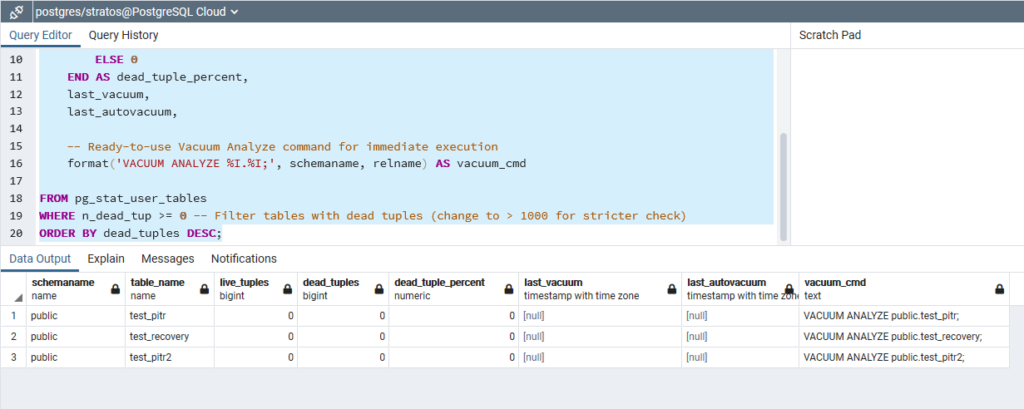
The query returns the following fields, each of which provides useful information:
schema name: The schema to which the table belongs (e.g.public).table_name: The name of the table.live_tuples(n_live_tup): The number of active/live recordings.dead_tuples(n_dead_tup): The number of dead records awaiting cleanup.dead_tuple_percent: The percentage of dead records out of the total table (bloat index).last_vacuum: Date/time last executed manuallyVACUUM.last_autovacuum: Date/time the automation was last runautovacuum.vacuum_cmd: Ready-made SQL command dynamically generated for you to run directlyVACUUM ANALYSISin the specific table.
Autovacuum vs Manual Vacuum
Cleanup in PostgreSQL can be done either automatically or manually:
Autovacuum It is a mechanism that runs continuously, monitors table statistics, and once it detects that the number of dead tuples has exceeded a certain threshold, it automatically starts the cleaning process.
On the other hand, the Manual Vacuum (VACUUM ANALYSIS) we run it regularly or after mass DELETE/UPDATE. Frees up dead tuple space within the table's data pages for future use. INSERT/UPDATE and at the same time updates the query planner statistics. It is worth noting that simple Vacuum does not return the space to the operating system, so it is required VACUUM FULL, which however takes an exclusive lock on the table.
For example, for manual cleaning we run:
VACUUM ANALYZE public.my_table;
Tuning and Best Practices for Autovacuum
The default settings for Autovacuum in PostgreSQL are designed for small environments. In production databases with high workloads, tuning is required either at the database level (postgresql.conf) or at the table level:
The most important parameter is the autovacuum_vacuum_scale_factor (default: 0.20). Specifies that the 20% of a table's records must be changed to activate autovacuum. In large tables, 20% is a huge number. Therefore, the recommended tactic is to lower it to 0.05 (5%) globally in the database or locally in the tables.
At the same time, the parameter autovacuum_max_workers (default: 3) determines how many parallel processes can vacuum different tables simultaneously. On servers with many CPU cores, it is a good idea to increase this to 6 or 8.
Finally, the autovacuum_vacuum_cost_limit (default: 200) limits the I/O consumed by autovacuum so that it does not affect the application. On fast disks, the value 200 is too conservative and delays cleanups. We can increase it to 1000 or 2000 so that cleanups complete very quickly.
For example, if we want to change the scale factor globally at the database level, we change to postgresql.conf the following parameter:
autovacuum_vacuum_scale_factor = 0.05However, if we want to change it only in a specific table, we run the following:
ALTER TABLE public.table
SET (autovacuum_vacuum_scale_factor = 0.05);