

How to do Connection Pooling in PostgreSQL with PgBouncer


Certifications:

In PostgreSQL, each new connection from an application or user creates a separate process in the operating system. When the connections are few, everything works smoothly. But when we have hundreds or thousands of simultaneous connections from applications, the database spends huge resources in RAM and CPU just to open and close and manage these processes.
Here comes the PgBouncer. It is a Connection Pooler for PostgreSQL. It sits between the application and the database, keeps a fixed, small number of open connections to PostgreSQL, and distributes thousands of incoming client connections across these few real connections.
PgBouncer supports three operating modes (pool_mode):
- Session pooling (default): The connection to the database is reserved by the client for the entire duration it is connected.
- Transaction pooling: The connection to the database is given to the client only for as long as a transaction lasts. Once it is done
COMMITtheROLLBACK, the connection immediately returns to the pool to serve the next client. It is the ideal choice for maximum performance. - Statement pooling: The connection returns to the pool after each individual query (does not allow multi-statement transactions).
Installing PgBouncer
In environment RHEL / Oracle Linux, install the package pgbouncer:
sudo yum install -y --nogpgcheck pgbouncer
Parameterization
We open the main PgBouncer configuration file:
sudo vi /etc/pgbouncer/pgbouncer.ini
In the section databases we declare which databases the pooler will serve and where they are located (in the classic port 5432 of PostgreSQL). In the section pgbouncer we define the port that PgBouncer will listen to (6432), the authentication method scram-sha-256, as well as the pool limits, max_client_conn = 1000 incoming connections that will be served by just default_pool_size = 20 actual connections per database:
[databases]
db_test = host=127.0.0.1 port=5432 dbname=db_test
postgres = host=127.0.0.1 port=5432 dbname=postgres

[pgbouncer]
listen_addr = 0.0.0.0
listen_port = 6432
auth_type = scram-sha-256
auth_file = /etc/pgbouncer/userlist.txt
logfile = /var/log/pgbouncer/pgbouncer.log
pidfile = /var/run/pgbouncer/pgbouncer.pid
admin_users = postgres
stats_users = stats, postgres

;pooling-mode
pool_mode = transaction
max_client_conn = 1000
default_pool_size = 20
User authentication setup
In order for PgBouncer to authenticate users without querying the database each time, it needs the users' password hashes in the file /etc/pgbouncer/userlist.txt.
These hashes are located in the system table. pg_shadow of PostgreSQL:
SELECT usename, passwd FROM pg_shadow;
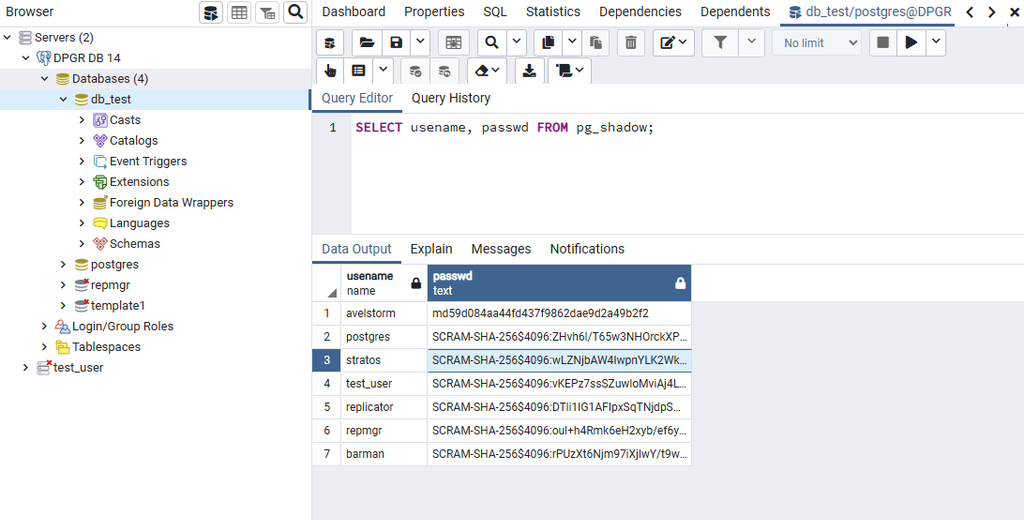
Alternatively, we can automatically export all users and their accounts with a single command from the terminal. SCRAM-SHA-256 their hashes in the exact format required by the userlist.txt:
sudo -u postgres psql -At -c "SELECT format('\"%s\" \"%s\"', usename, passwd) FROM pg_shadow;" | sudo tee -a /etc/pgbouncer/userlist.txt
If we open the file we will see that the users have been passed:
sudo vi /etc/pgbouncer/userlist.txt
For example:
"stratos" "SCRAM-SHA-256$4096:wLZNjbAW4IwpnYLK2WkwqA==$uxoJFZ4HCUvTnxes8qFqymhCyVno5iEWHjt15sw7g14=:HouE32Db3EAcfWaBGsgTKJf3WnMdfmAYDqLxZnVeSvY="
"postgres" "SCRAM-SHA-256$4096:ZHvh6l/T65w3NHOrckXPyQ==$B41RvwPvqKKJvZR2wPq9SjBVK3c/YcaiqjCIfnclYtc=:PweXqH2NfQ2W9PKTJAahPUWVhOXCjgTQ2g84zyQ5lUs="
PgBouncer Startup
We enable the PgBouncer service so that it starts automatically with the system:
sudo systemctl enable --now pgbouncer
We are now trying to connect to our base, not the door. 5432, but at the door 6432 of PgBouncer (it will ask us for the user's password for authentication):
psql -h 127.0.0.1 -p 6432 -U postgres -d db_test
Stress Test with pgbench
To see connection pooling in action, we use the tool pgbench. We send 100 simultaneous clients with 10 threads for 30 seconds on the door 6432:
pgbench -c 100 -j 10 -T 30 -M simple -h 127.0.0.1 -p 6432 -U stratos db_test
Although the pgbench opened 100 connections, PostgreSQL behind accepted at most 20 connections (default_pool_size = 20), keeping memory and CPU consumption at perfectly controlled levels.
Monitoring PgBouncer through pgAdmin (with dblink)
PgBouncer has its own virtual management database named pgbouncer, in which we can run commands like SHOW POOLS and SHOW STATS through the psqlHowever, because it is not a true PostgreSQL database, tools like pgAdmin they cannot be connected directly to it.
So that we can see PgBouncer statistics with simple SELECT through pgAdmin, we can use dblink.
First, we activate the extension in our database:
CREATE EXTENSION IF NOT EXISTS dblink;
1. Create a View for SHOW POOLS
We create the view pgbouncer_pools which is connected internally to the door 6432 and brings the image of the pools into a regular table:
CREATE OR REPLACE VIEW pgbouncer_pools AS
SELECT *
FROM dblink(
    'host=127.0.0.1 port=6432 dbname=pgbouncer user=postgres password=Password',
    'SHOW POOLS;'
) AS t (
    database text,
    "user" text,
    cl_active int,
    cl_waiting int,
    cl_active_cancel_req int,
    cl_waiting_cancel_req int,
    sv_active int,
    sv_active_cancel int,
    sv_being_canceled int,
    sv_idle int,
    sv_used int,
    sv_tested int,
    sv_login int,
    maxwait int,
    maxwait_us int,
    pool_mode text
);
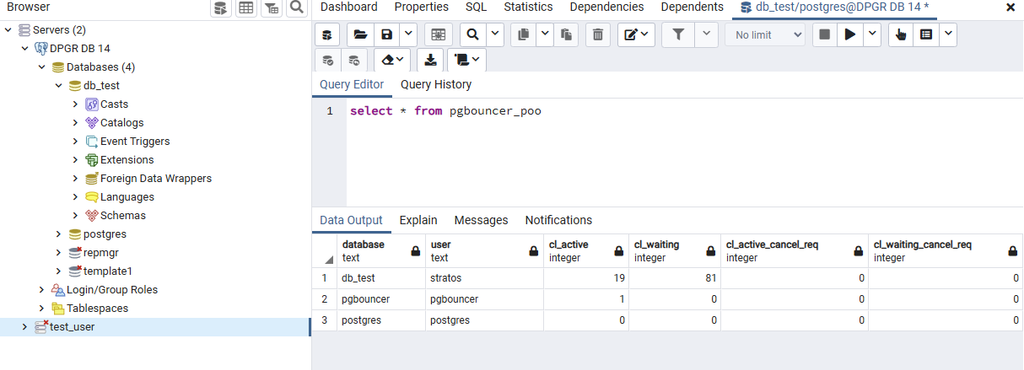
Now we can check the pools with a simple SELECT:
SELECT * FROM pgbouncer_pools;
2. Create a View for SHOW STATS
Accordingly, we create a second view for overall traffic and response time statistics:
CREATE OR REPLACE VIEW pgbouncer_stats AS
SELECT *
FROM dblink(
    'host=127.0.0.1 port=6432 dbname=pgbouncer user=postgres password=Password',
    'SHOW STATS;'
) AS t (
    database text,
    total_server_assignment_count bigint,
    total_xact_count bigint,
    total_query_count bigint,
    total_received bigint,
    total_sent bigint,
    total_xact_time bigint,
    total_query_time bigint,
    total_wait_time bigint,
    avg_server_assignment_count bigint,
    avg_xact_count bigint,
    avg_query_count bigint,
    avg_recv bigint,
    avg_sent bigint,
    avg_xact_time bigint,
    avg_query_time bigint,
    avg_wait_time bigint
);
And we see the results with:
SELECT * FROM pgbouncer_stats;
3. Unified Dashboard Query with JOIN
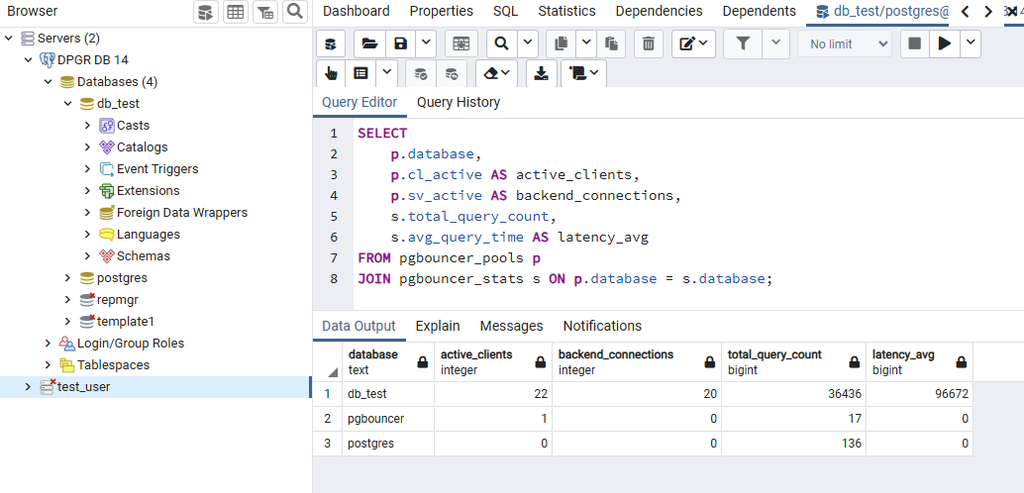
Now that we have both views in PostgreSQL, we can join them with a JOIN to have on one screen in pgAdmin the active connections with the actual connections to the database, the total queries and the average latency:
SELECT
    p.database,
    p.cl_active AS active_clients,
    p.sv_active AS backend_connections,
    s.total_query_count,
    s.avg_query_time AS latency_avg
FROM pgbouncer_pools p
JOIN pgbouncer_stats s ON p.database = s.database;
Running this query during the benchmark, we clearly see how while the active_clients they go up, the backend_connections are stuck at the limit we have set (20).
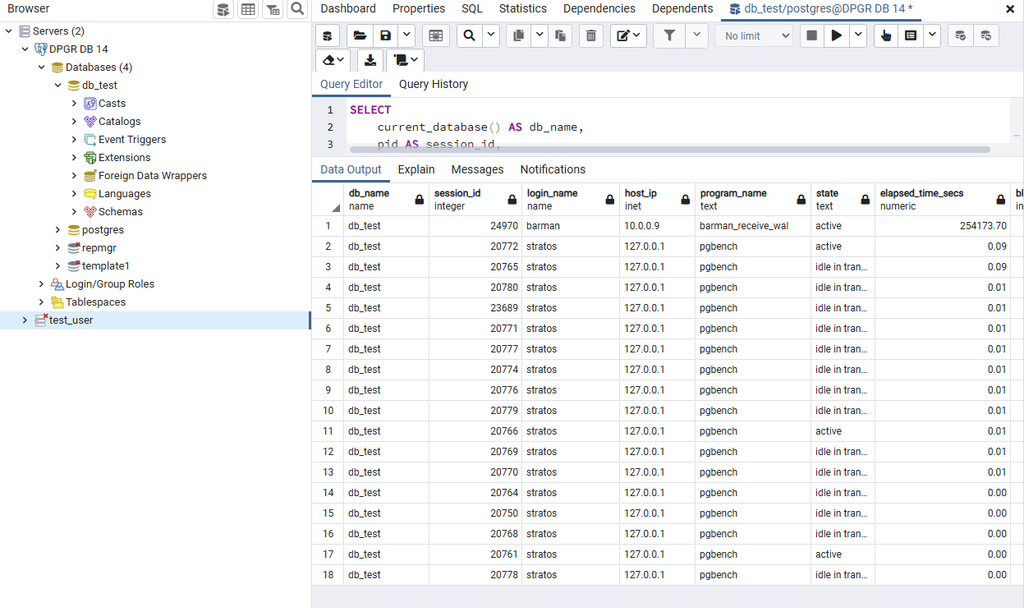
What will we see if we check what is happening right now from the pg_stat_activity
A very important feature of PgBouncer is that it works as transparent proxy.
If during the time there are active sessions we check the system view pg_stat_activity of PostgreSQL, we will not see the 100 connections that the application opened to PgBouncer, but only the actual (up to 20) connections that PgBouncer has opened to the database.
At the same time, because PgBouncer is transparent:
- In the column
login_nameofpg_stat_activitywe will normally see the name of the actual user of the application (e.g.stratospheric) and not a general userpgbouncer. - In the column
program_namethe name of the application that sent the query is passed as is (e.g.pgbench). - In the column
client_addrwe will see the IP of PgBouncer (127.0.0.1if it runs on the same server).