


How to Partition an Existing Table in PostgreSQL and How to Maintain It

Certifications:

After seeing similar practices in SQL Server, it's time to move on to PostgreSQL and see how we can partition an existing table that is already full of data, how we control existing partitions, how we automate the creation of future partitions, and how we safely clean up old data.
PostgreSQL does not allow converting a regular table to partitioned in-place. The typical process involves renaming the old table, creating the new partitioned table, bulk transferring the data, and finally cleaning it up.
The footsteps
First we rename the existing table:
ALTER TABLE public.orders RENAME TO orders_old;
Then we create the new Partitioned table with Range Partition by date:
CREATE TABLE public.orders (
    order_id integer,
    customer_id integer,
    order_date timestamp without time zone NOT NULL,
    status character varying(20),
    total_amount numeric(10,2),
    PRIMARY KEY (order_id, order_date)
) PARTITION BY RANGE (order_date);
Then we create the monthly partitions for the year:
CREATE TABLE orders_2026m01 PARTITION OF public.orders
    FOR VALUES FROM ('2026-01-01') TO ('2026-02-01');
CREATE TABLE orders_2026m02 PARTITION OF public.orders
    FOR VALUES FROM ('2026-02-01') TO ('2026-03-01');
CREATE TABLE orders_2026m03 PARTITION OF public.orders
    FOR VALUES FROM ('2026-03-01') TO ('2026-04-01');
CREATE TABLE orders_2026m04 PARTITION OF public.orders
    FOR VALUES FROM ('2026-04-01') TO ('2026-05-01');
CREATE TABLE orders_2026m05 PARTITION OF public.orders
    FOR VALUES FROM ('2026-05-01') TO ('2026-06-01');
CREATE TABLE orders_2026m06 PARTITION OF public.orders
    FOR VALUES FROM ('2026-06-01') TO ('2026-07-01');
CREATE TABLE orders_2026m07 PARTITION OF public.orders
    FOR VALUES FROM ('2026-07-01') TO ('2026-08-01');
CREATE TABLE orders_2026m08 PARTITION OF public.orders
    FOR VALUES FROM ('2026-08-01') TO ('2026-09-01');
CREATE TABLE orders_2026m09 PARTITION OF public.orders
    FOR VALUES FROM ('2026-09-01') TO ('2026-10-01');
CREATE TABLE orders_2026m10 PARTITION OF public.orders
    FOR VALUES FROM ('2026-10-01') TO ('2026-11-01');
CREATE TABLE orders_2026m11 PARTITION OF public.orders
    FOR VALUES FROM ('2026-11-01') TO ('2026-12-01');
CREATE TABLE orders_2026m12 PARTITION OF public.orders
    FOR VALUES FROM ('2026-12-01') TO ('2027-01-01');
Then we create an index on the field we partitioned:
CREATE INDEX idx_order_date ON public.orders (order_date);
The next step is to transfer the data from the old table to the new one:
INSERT INTO public.orders SELECT * FROM orders_old;
Finally we can delete the old table:
DROP TABLE IF EXISTS public.orders_old CASCADE;
How to view existing Partitions and Ranges
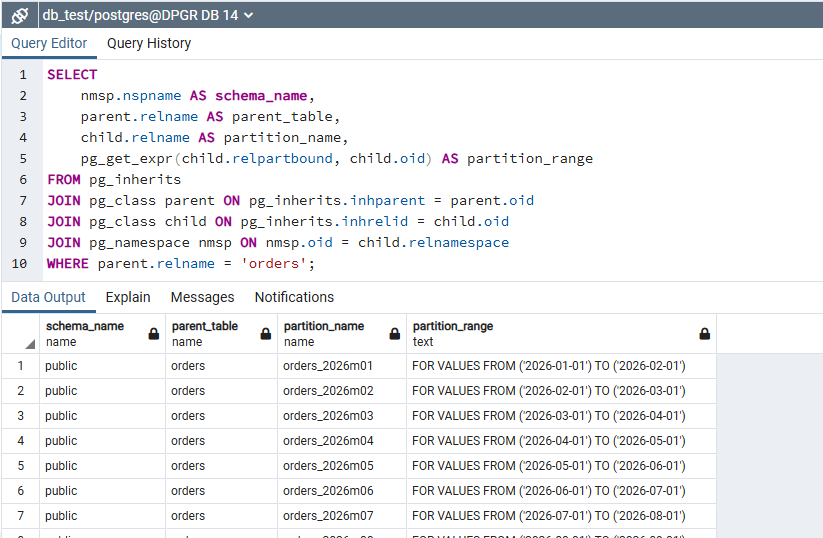
To confirm which partitions are active and which range each one covers, we run the following query using the function pg_get_expr:
SELECT
    nmsp.nspname AS schema_name,
    parent.relname AS parent_table,
    child.relname AS partition_name,
    pg_get_expr(child.relpartbound, child.oid) AS partition_range
FROM pg_inherits
JOIN pg_class parent ON pg_inherits.inhparent = parent.oid
JOIN pg_class child ON pg_inherits.inhrelid = child.oid
JOIN pg_namespace nmsp ON nmsp.oid = child.relnamespace
WHERE parent.relname = 'orders';
How can we quickly and safely delete old Partitions?
When we want to apply retention policy and delete old data, e.g. January 2026, immediately freeing up space, we follow the logic of Metadata Switch of SQL Server, we detach the partition from the table and then delete it:
ALTER TABLE public.orders DETACH PARTITION orders_2026m01;
DROP TABLE orders_2026m01;
How can we automate the creation of next year's Partitions?
To avoid having to manually create partitions every year, we can create a function that automatically calculates the next year and creates the 12 months:
CREATE OR REPLACE FUNCTION create_next_year_monthly_partitions_orders()
RETURNS void AS $$
DECLARE
    target_year int;
    m int;
    partition_name text;
    start_date text;
    end_date text;
BEGIN
    target_year := EXTRACT(YEAR FROM CURRENT_DATE) + 1;

    FOR m IN 1..12 LOOP

        partition_name := format('orders_%sm%s', target_year, lpad(m::text, 2, '0'));

        IF m = 12 THEN
            start_date := format('%s-12-01', target_year);
            end_date   := format('%s-01-01', target_year + 1);
        ELSE
            start_date := format('%s-%s-01', target_year, lpad(m::text, 2, '0'));
            end_date   := format('%s-%s-01', target_year, lpad((m + 1)::text, 2, '0'));
        END IF;

        IF NOT EXISTS (
            SELECT 1 FROM pg_class c
            JOIN pg_namespace n ON n.oid = c.relnamespace
            WHERE c.relname = partition_name
        ) THEN
            EXECUTE format(
                'CREATE TABLE %I PARTITION OF public.orders FOR VALUES FROM (%L) TO (%L);',
                partition_name, start_date, end_date
            );
        END IF;

    END LOOP;
END;
$$ LANGUAGE plpgsql;
To automatically run the function every month at 06:00 in the morning, we configure the user's crontab postgres:
sudo -u postgres crontab -e
By adding the following line of programming:
0 6 1 * * psql -d db_test -c "SELECT create_next_year_monthly_partitions_orders();"