

How can we connect SQL Server to another SQL Server using Linked Server?

Certifications:
THE SQL Server allows us to connect and execute queries on remote Database Instances that do not necessarily have to be in the same RDBMS. In this article we will see specifically how to do it from one instance of SQL Server to another instance of SQL Server using Linked Server.
In previous article we had seen how to connect SQL Server to Oracle using PolyBase. The main difference is that with Linked Server we don't simply read data but we can execute Stored Procedures and modify the data with inserts, updates, deletes.
* All the differences between Linked Server and PolyBase can be read from here.
The installation
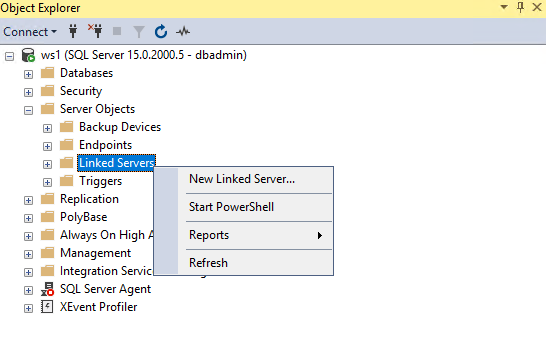
First, we connect to SQL Server from SQL Server Management Studio and we choose Server Objects and right click Linked Server, New Linked Server…:
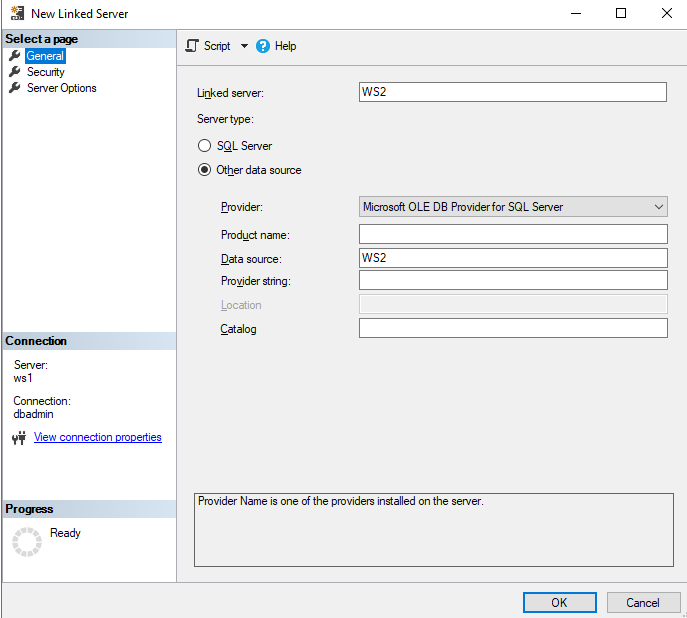
In the tab General we define the name we want to have Linked Server, as Server type Provider Microsoft OLE DB Provider for SQL Server and as Data source the name of the SQL Server instance we want to connect to:
In the tab Security we choose Be made using this security context and we enter the user credentials of the remote SQL Server instance to which we will connect:

*Be careful, with the option “Be made using this security context” any user who has access to the local server can run queries on the remote server with the permissions of the user “dbadmin” that we used in the example, the alternative option if we want to limit this is “Be made using the login's current security context” which will essentially run the query with the permissions it has on the remote server the user who executes it, but its use requires that the two servers belong to the same domain and the use of accounts with Windows Authentication in Active Directory.
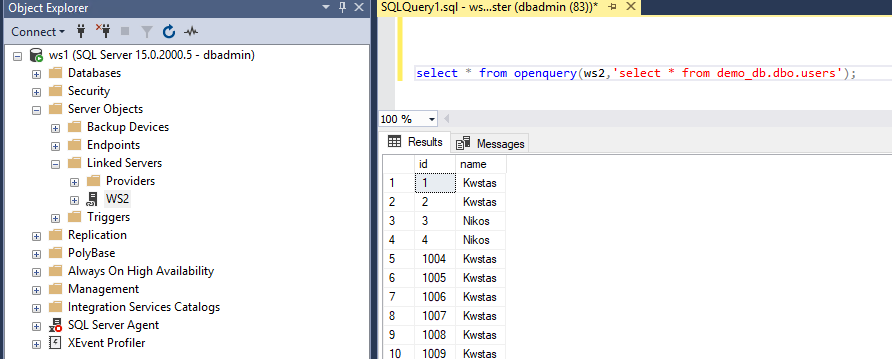
By completing the Linked Server we can with the use openquery call the Linked Server we created and define the query we want to run on the other SQL Server instance:
select * from openquery(ws2,'select * from demo_db.dbo.users');