


How to restore an Oracle Database that is in archive-log mode with RMAN Restore


Certifications:

In previous In this article we saw how to backup an Oracle database with RMAN, in this article we will see a simple case of data recovery with RMAN RestoreThere are many sub-cases with different steps, each of which we will see the steps to recover the database on the same machine with the same name.
The footsteps
First, we run the following query to see the names, location and time of each backup, in our case we will assume that we want to restore the database to 16/01/2025 15:29:00 :
select to_char(end_time, 'DY dd/mm/yyyy hh24:mi:ss') ended_time, duration,
       status, type, size_mb
  from (SELECT /*+ RULE */
         dt.start_time strt_time, dt.end_time end_time, dt.time_taken_display duration,
         dt.status, dt.input_type || decode(input_type, 'DB INCR',
                                                        ' level ' || to_char(bsd.incr_level),
                                                        '') type,
         to_char(dt.output_bytes/1024/1024, '999g999g990d00', 'NLS_NUMERIC_CHARACTERS=,.') as SIZE_MB
          from v$rman_backup_job_details dt,
               (select /*+ RULE */ session_stamp, session_recid, min(incremental_level) incr_level
                  from v$backup_set_details
                 group by session_stamp, session_recid) bsd
         where dt.session_stamp = bsd.session_stamp
           and dt.session_recid = bsd.session_recid
        union all
        select null, p.completion_time, null, null, p.handle,
               to_char(d.blocks * d.block_size/1024/1024, '999g999g990d00', 'NLS_NUMERIC_CHARACTERS=,.') size_mb
          from v$backup_piece p, v$backup_datafile d
         where d.set_stamp = p.set_stamp
           and d.set_count = p.set_count
           and d.file# = 0)
 where end_time >= sysdate - 7 -- last 7 days
 order by end_time desc nulls last
/

Before restoring the database, we must delete all of its files from the operating system, so before downloading it, we run the following query to generate the commands:
select 1 as type, 'rm "'||name||'"' os_cmd from v$controlfile
union all
select 2, 'rm "'||member||'"' from v$logfile
union all
select 3, 'rm "'||name||'"' from v$datafile
union all
select 4, 'rm "'||name||'"' from v$tempfile
union all
select 5, 'rm -rf "'|| value ||'"' from v$parameter where name like '%_dump_dest'
||case when (select to_number(lpad(version, instr(version, '.', 1, 1)-1)) from v$instance) > 10 then 'garb' else '' end
union all
select 6, 'mkdir -p "'|| value ||'"' from v$parameter where name like '%_dump_dest'
||case when (select to_number(lpad(version, instr(version, '.', 1, 1)-1)) from v$instance) > 10 then 'garb' else '' end
union all
select 7, '# rm -rf "'||substr(value, 1, instr(value, dir_sep, -1)-1) ||'"'
from v$parameter, (select decode(substr(name, 2, 2), ':\', '\', '\\', '\', '/') as dir_sep from v$datafile where rownum=1) b
where name like 'core_dump_dest'
||case when (select to_number(lpad(version, instr(version, '.', 1, 1)-1)) from v$instance) < 11 then 'garb' else '' end
union all
select 8, '# mkdir -p "'||substr(value, 1, instr(value, dir_sep, -1)-1) ||'"'
from v$parameter, (select decode(substr(name, 2, 2), ':\', '\', '\\', '\', '/') as dir_sep from v$datafile where rownum=1) b
where name like 'core_dump_dest'
||case when (select to_number(lpad(version, instr(version, '.', 1, 1)-1)) from v$instance) < 11 then 'garb' else '' end
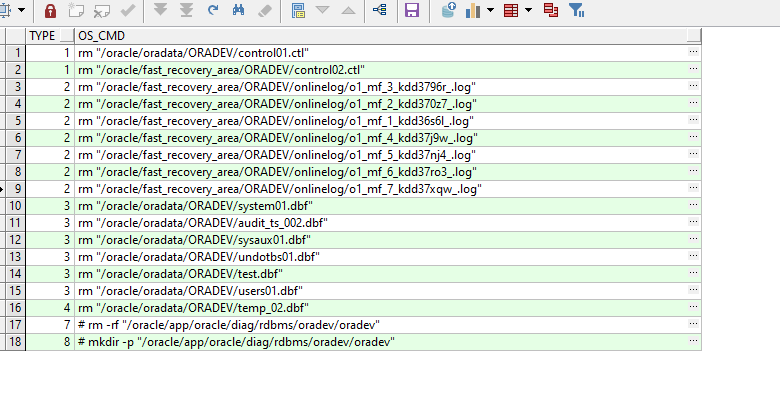
Download the database after first creating one pfile from the spfile and delete its files with the commands we generated before:
sqlplus / as sysdba

create pfile from spfile;

shutdown immediate;

exit
Then we lift up to nomount state with pfile:
sqlplus / as sysdba

startup nomount pfile=$ORACLE_HOME/dbs/initoradev.ora;

exit;
We connect to RMAN and we restore it control file if necessary:
rman target /

restore controlfile from '/oracle/app/backup/20250116__controldb__ce3fd0vj_1_1';

exit
We see that we successfully restored it:
Starting restore at 16/01/025 15:53
using channel ORA_DISK_1

channel ORA_DISK_1: restoring control file
channel ORA_DISK_1: restore complete, elapsed time: 00:00:00
output file name=/oracle/app/oracle/product/19.3.0/dbhome_1/dbs/cntrloradev.dbf
Finished restore at 16/01/025 15:53
We open the database in mount state and we do catalogue the location containing the backups:
alter database mount;
catalog start with '/oracle/app/backup';
The restoration
We run the following command in RMAN so that we can do restore, in case we restore them to another path then we do set newname each datafile number in the new path:
run{
 allocate channel t1 type disk;
##SET NEWNAME FOR tempfile 1 to '/u01/app/oracle/oradata/.../TEMP01.DBF';
##set newname for datafile 1 to '/u01/app/oracle/oradata/.../SYSTEM01.DBF';
restore database;
switch datafile all;
switch tempfile all;
 }
exit;
allocated channel: t1
channel t1: SID=151 device type=DISK

Starting restore at 16/01/025 15:58

channel t1: starting datafile backup set restore
channel t1: specifying datafile(s) to restore from backup set
channel t1: restoring datafile 00001 to /oracle/oradata/ORADEV/system01.dbf
channel t1: restoring datafile 00002 to /oracle/oradata/ORADEV/audit_ts_002.dbf
channel t1: restoring datafile 00003 to /oracle/oradata/ORADEV/sysaux01.dbf
channel t1: restoring datafile 00004 to /oracle/oradata/ORADEV/undotbs01.dbf
channel t1: restoring datafile 00005 to /oracle/oradata/ORADEV/test.dbf
channel t1: restoring datafile 00007 to /oracle/oradata/ORADEV/users01.dbf
channel t1: reading from backup piece /oracle/app/backup/20250116__fulldb__cd3fd0vd_1_1
channel t1: piece handle=/oracle/app/backup/20250116__fulldb__cd3fd0vd_1_1 tag=TAG20250116T151909
channel t1: restored backup piece 1
channel t1: reading from backup piece /oracle/app/backup/20250116__fulldb__cd3fd0vd_2_1
channel t1: piece handle=/oracle/app/backup/20250116__fulldb__cd3fd0vd_2_1 tag=TAG20250116T151909
channel t1: restored backup piece 2
channel t1: reading from backup piece /oracle/app/backup/20250116__fulldb__cd3fd0vd_3_1
channel t1: piece handle=/oracle/app/backup/20250116__fulldb__cd3fd0vd_3_1 tag=TAG20250116T151909
channel t1: restored backup piece 3
channel t1: reading from backup piece /oracle/app/backup/20250116__fulldb__cd3fd0vd_4_1
channel t1: piece handle=/oracle/app/backup/20250116__fulldb__cd3fd0vd_4_1 tag=TAG20250116T151909
channel t1: restored backup piece 4
channel t1: restore complete, elapsed time: 00:00:04
Finished restore at 16/01/025 15:58

released channel: t1
Once completed with the following query we see the time point where the database is located:
set linesize 512 trimspool on pages 1000
column nxtchng format 99999999999999999999
column checkpoint_time format a20
column fuzzy format a5
column cnt format 999999
select /*+ RULE */
status, checkpoint_change# nxtchng,
to_char(checkpoint_time, 'DD/MM/YYYY HH24:MI:SS') as checkpoint_time, fuzzy,
count(*) as cnt
from v$datafile_header
group by status, checkpoint_change#, checkpoint_time, fuzzy
order by status, checkpoint_change#, checkpoint_time, fuzzy;
We see that it is at the time 15:19:09 and we want to take it 10 minutes later. To do this we will have to do a recovery with set until time:
STATUS                NXTCHNG CHECKPOINT_TIME      FUZZY     CNT
------- --------------------- -------------------- ----- -------
ONLINE               23933495 16/01/2025 15:19:09  NO          6
The recovery
To do recovery and the database arrives at the time 15:29:00 we connect to RMAN and run the following with the parameter set until time:
rman target /
run
{
allocate channel ch01 type disk;
set archivelog destination to '/oracle/fast_recovery_area/ORADEV/archivelog';
set until time "to_date('16/01/2025 15:29:00','dd/mm/yyyy hh24:mi:ss')";
recover database;
}
exit;
Starting recover at 16/01/025 17:26

starting media recovery

channel ch01: starting archived log restore to user-specified destination
archived log destination=/oracle/fast_recovery_area/ORADEV/archivelog
channel ch01: restoring archived log
archived log thread=1 sequence=121
channel ch01: restoring archived log
archived log thread=1 sequence=122
channel ch01: restoring archived log
archived log thread=1 sequence=123
channel ch01: reading from backup piece /oracle/app/backup/20250116___archivesdb_ci3fd1m7_1_1
channel ch01: piece handle=/oracle/app/backup/20250116___archivesdb_ci3fd1m7_1_1 tag=TAG20250116T153119
channel ch01: restored backup piece 1
channel ch01: restore complete, elapsed time: 00:00:01
archived log file name=/oracle/fast_recovery_area/ORADEV/archivelog/1_121_1163221998.dbf thread=1 sequence=121
archived log file name=/oracle/fast_recovery_area/ORADEV/archivelog/1_122_1163221998.dbf thread=1 sequence=122
archived log file name=/oracle/fast_recovery_area/ORADEV/archivelog/1_123_1163221998.dbf thread=1 sequence=123
media recovery complete, elapsed time: 00:00:01
Finished recover at 16/01/025 17:26
released channel: ch01
After the recovery is complete, we confirm the database time with the query we ran before:
set linesize 512 trimspool on pages 1000
column nxtchng format 99999999999999999999
column checkpoint_time format a20
column fuzzy format a5
column cnt format 999999
select /*+ RULE */
status, checkpoint_change# nxtchng,
to_char(checkpoint_time, 'DD/MM/YYYY HH24:MI:SS') as checkpoint_time, fuzzy,
count(*) as cnt
from v$datafile_header
group by status, checkpoint_change#, checkpoint_time, fuzzy
order by status, checkpoint_change#, checkpoint_time, fuzzy;
STATUS                NXTCHNG CHECKPOINT_TIME      FUZZY     CNT
------- --------------------- -------------------- ----- -------
ONLINE               23936249 16/01/2025 15:29:00  NO          6
Once completed, we open it in open state with the parameter resetlogs and if everything goes well we restart it:
sqlplus / as sysdba

alter database open resetlogs;

shutdown immediate;

startup;

exit;